

The back office, built around your warehouse
Kompass is the framework behind every sale: orders from every channel, a warehouse system as simple or as detailed as you need, one catalogue for every place you sell, and the numbers on top. It is modular, so we switch on what your business needs and build what it doesn't have yet.
- 3
- levels of warehouse, from a few shelves to zones, docks and recalls
- FEFO
- picking by best-before, batch by batch, on the iPad
- 1
- stock ledger behind every channel, warehouse and till
- £0
- transaction or per-order fees, on any channel
The back-office framework
A framework, not a package.
Kompass is made of modules that share one ledger, one catalogue and one customer list. That is why the same framework can run a single stock room or a chilled, batch-tracked warehouse, and why changing it later never means starting again.
Switch on what you need
Orders, warehouse, products, purchasing, documents and insights are modules. A business with three shelves doesn't wade through screens built for thirty aisles.
Shape what is there
Steps, fields, documents and roles are shaped to how your team already works, not the other way round.
Build what is missing
When a business needs something no module does, like deposit lines or a screen on the warehouse wall, we build it into Kompass, on the same ledger.
Start to finish
One order, start to finish.
Follow a trade order through Kompass. Nothing is typed twice, and every step is logged by name.
The order lands
From the online store, a Kassa till, the sales desk or the phone. Kompass checks what is on the shelf, not just what a spreadsheet says.
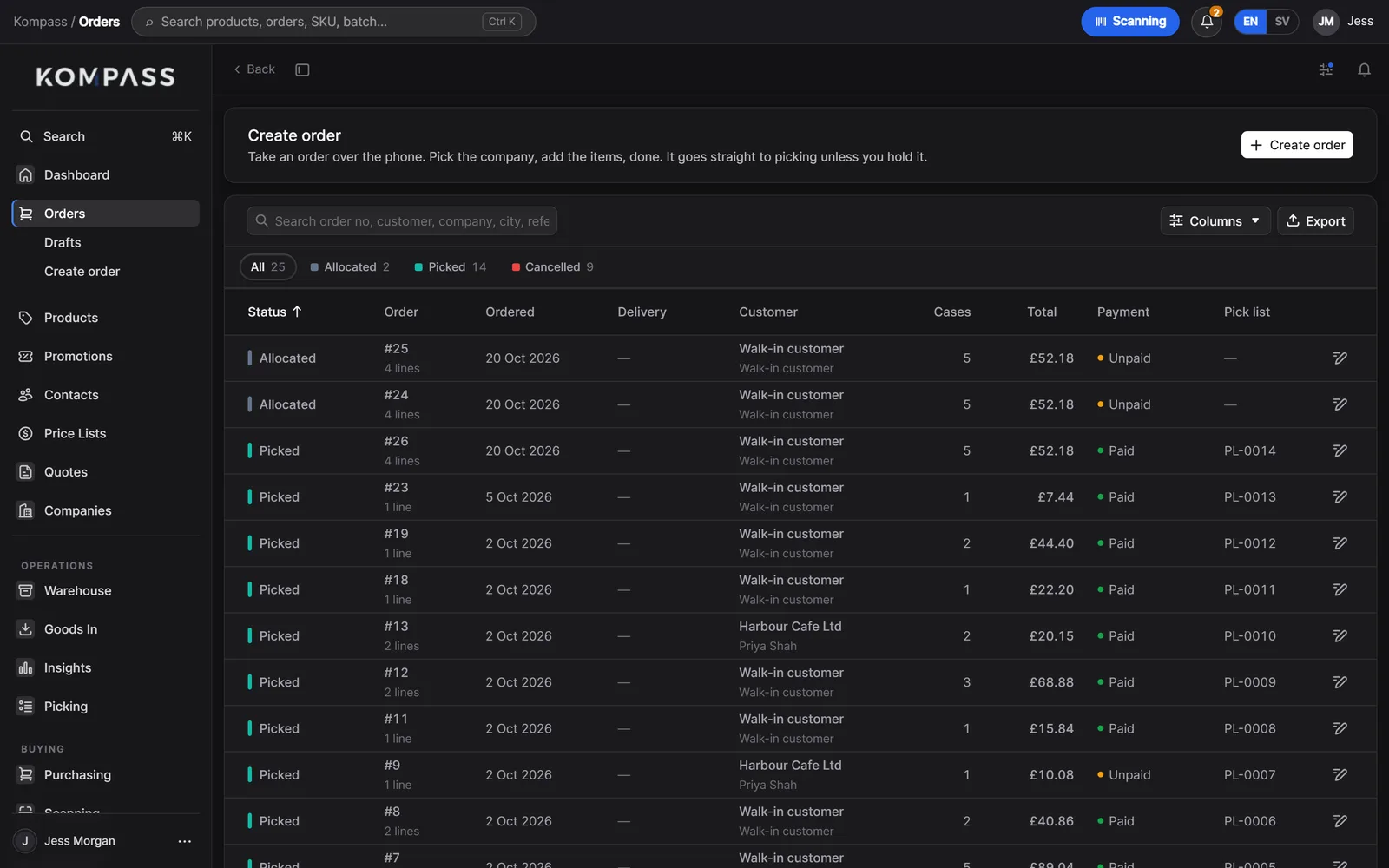
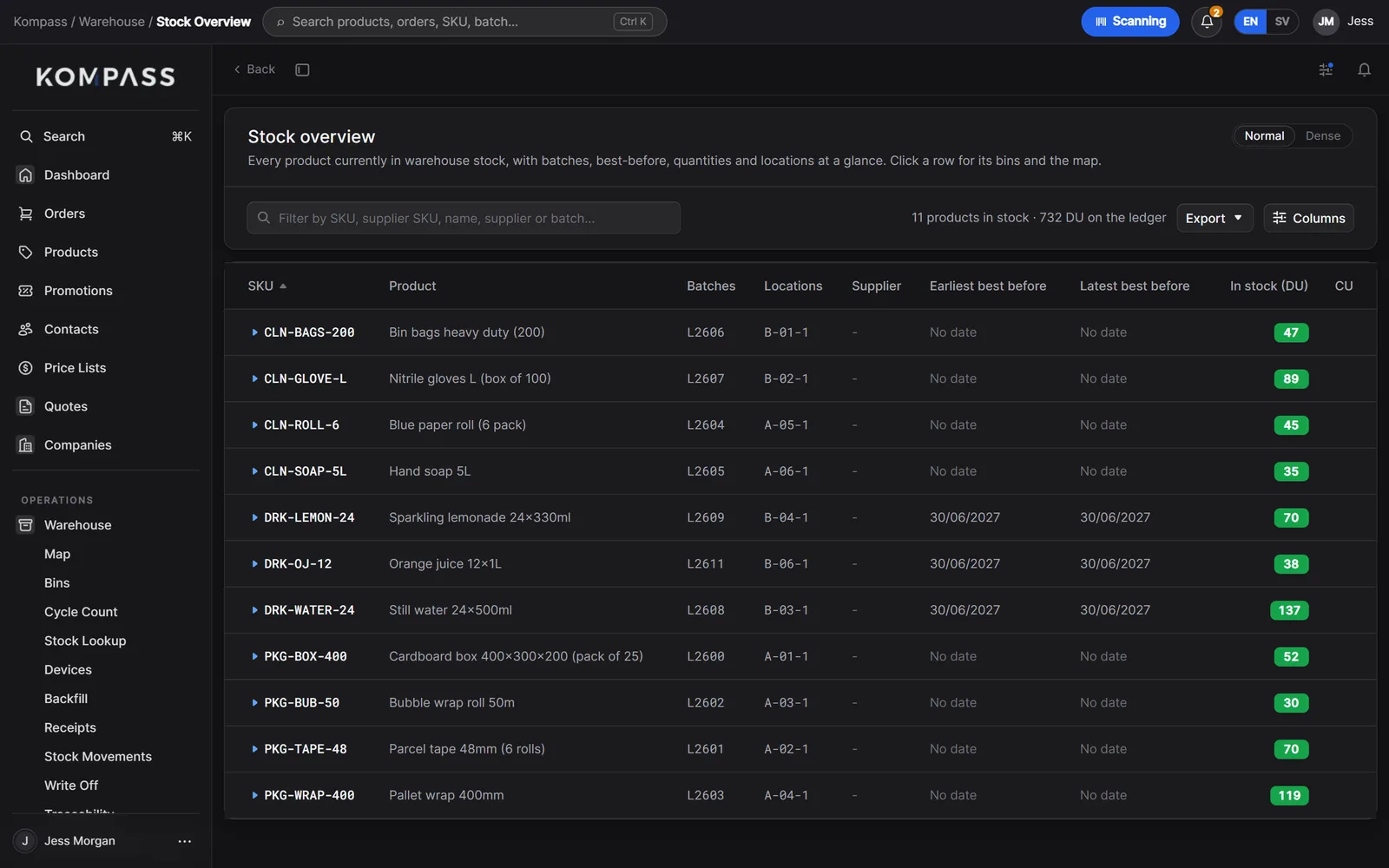
The right batch is held
Stock is reserved from the batch with the earliest best-before, so the oldest goods leave first.
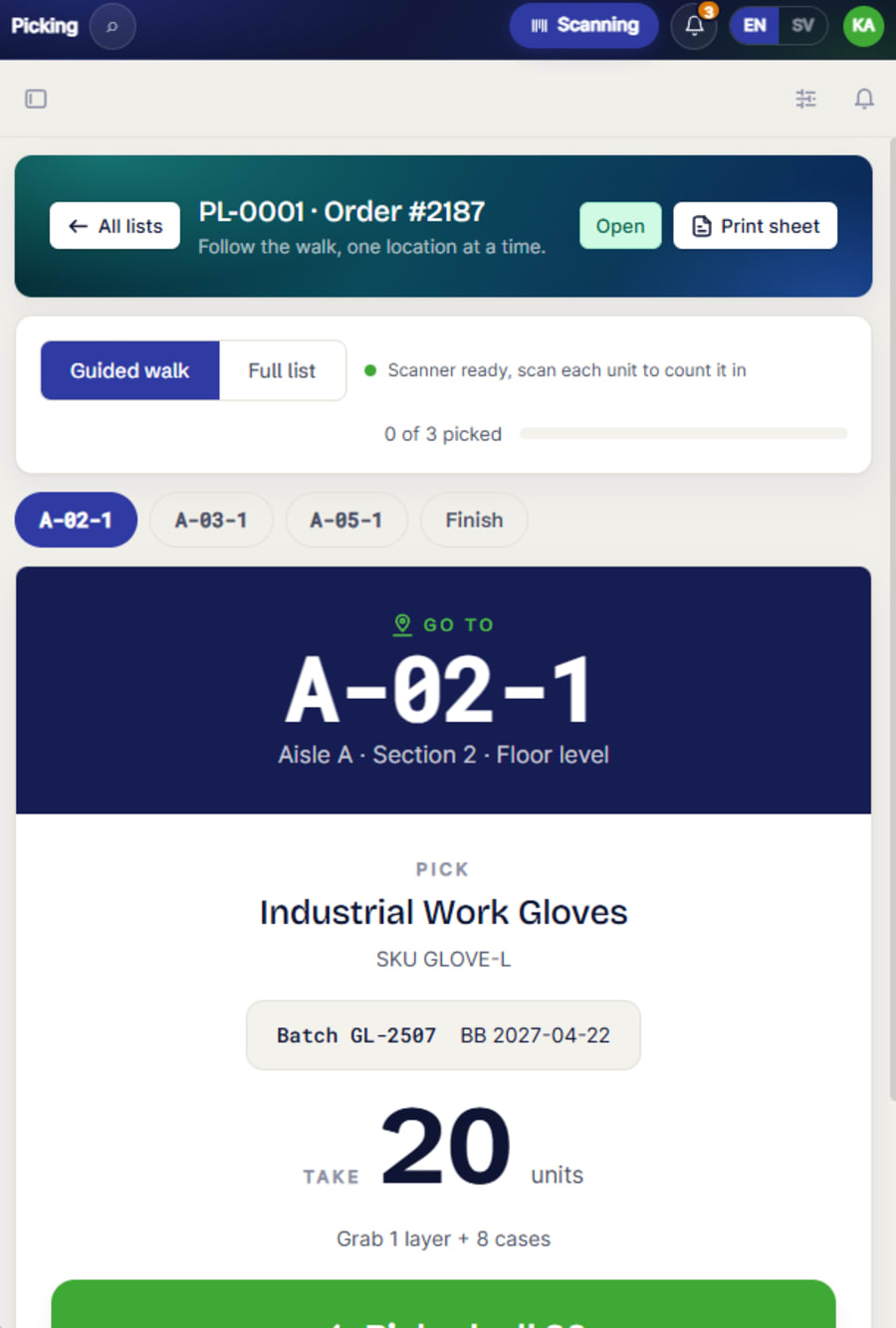
It is picked on the iPad
A guided walk in bin order. Scanning the shelf label confirms the place, scanning the case confirms the goods.
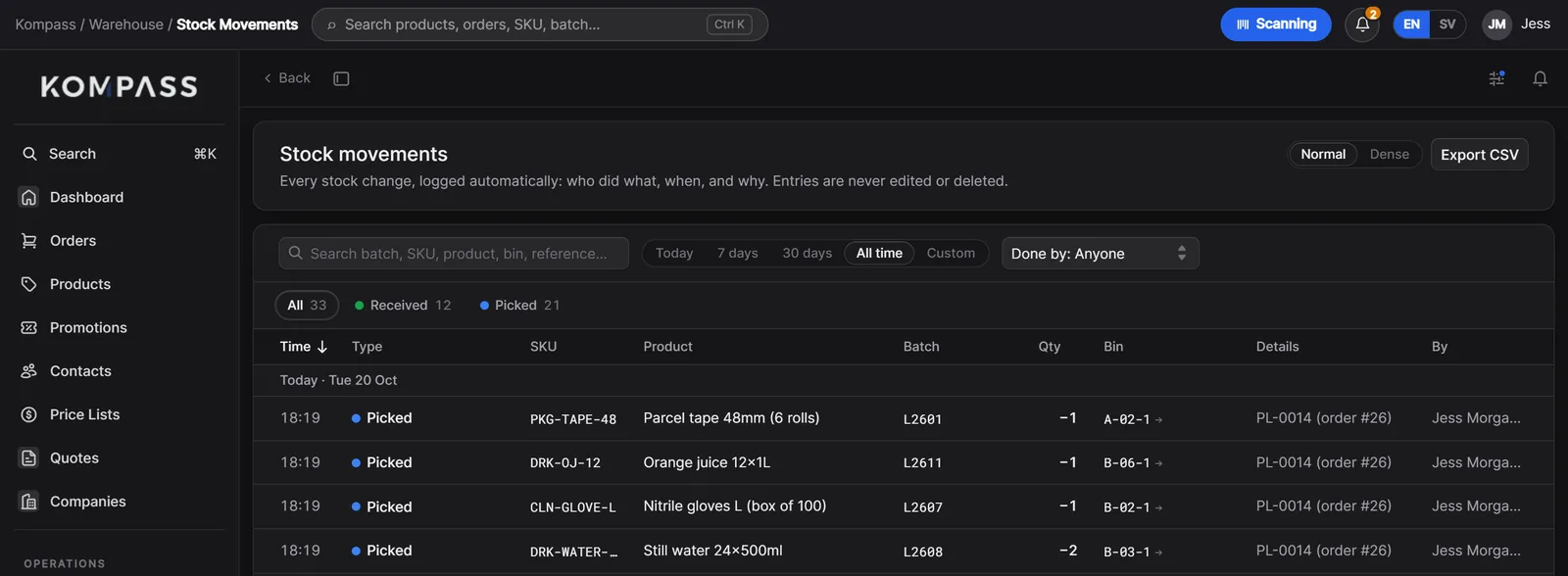
Every move is written down
Each pick lands in the stock ledger with the batch, the bin and who did it. Entries are never edited or deleted.
Paperwork and accounts follow
The delivery note fills itself in with batch numbers, and a draft invoice goes to your accounting software.
The WMS
As simple as you need. As detailed as you need.
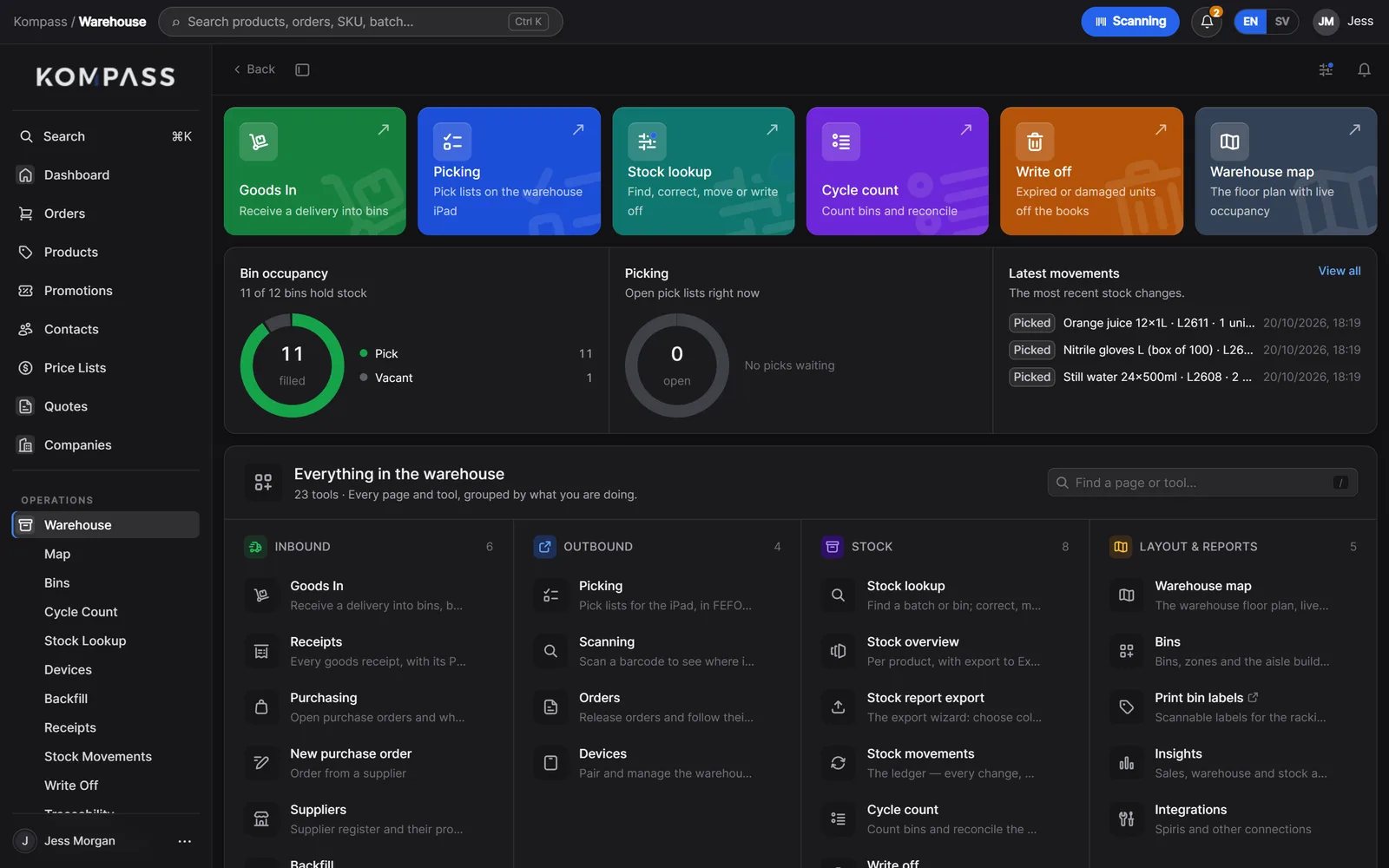
The warehouse system is the heart of Kompass. It can start as a few shelves and grow, module by module, into zones, docks and recalls. Same system, same data, nothing to move across.
A warehouse drawn three ways. The same Kompass runs all three, with more switched on as it grows.
Bins, batches and scanning.
For racking, dated goods and a small picking team.
11 of 17 switched on
- Stock by product and place, on
- Goods in against purchase orders, on
- Pick lists from every order, on
- Stock counts, on
- Every movement logged by name, on
- Named bins and a warehouse map, on
- Batches and best-before, on
- FEFO picking on the iPad, on
- GS1 barcode scanning, on
- Delivery notes with batch numbers, on
- Cycle counts by area, on
- Zones: ambient, chilled, quarantine, off
- Traceability and recall lists, off
- Delivery control and quality checks, off
- Cases, pallets and SSCC labels, off
- Bin suggestions on goods in, off
- Screens on the warehouse wall, off
Orders
Every channel, one order list.
Kompass is the order management system behind every way you sell: its own online store, Kassa tills and sales desks, marketplaces and other channels, email and the phone. Each order is checked against real stock and goes to picking on its own.
- Its own online store, with account pricing, on the same catalogue
- Kassa tills, sales desks and shops selling from the same stock
- Marketplaces and third-party channels connected through integrations
- Statuses anyone can read, from received to delivered, and exports in any shape
Stock
Stock you can find, and trace.
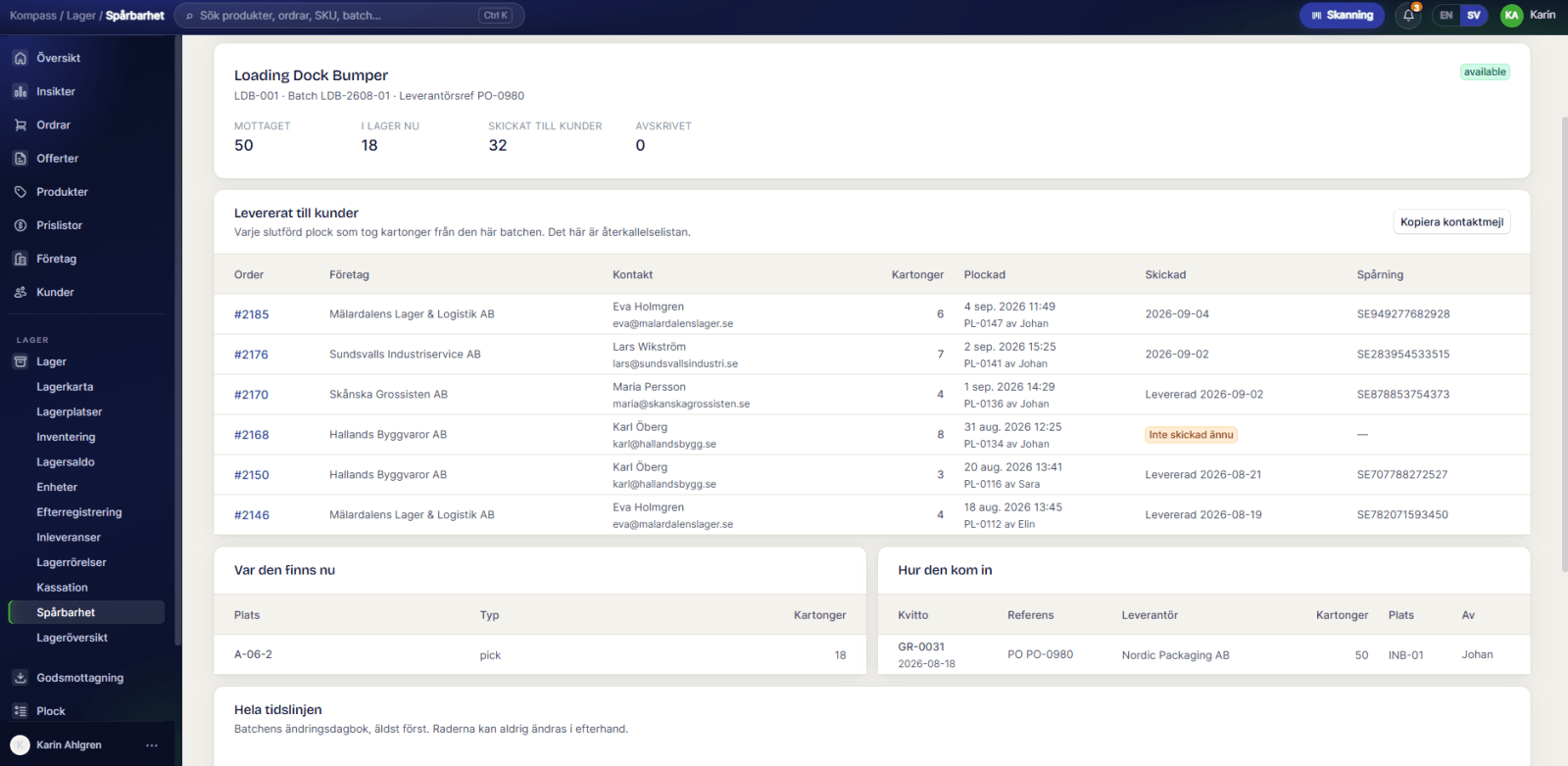
Every case is held by batch and best-before, in a named bin. Search a product and the map lights up where it sits. Pick any batch and see every customer who received it.
- Stock overview with batches, bins and best-before on one page
- A warehouse map you lay out like the real building
- Traceability from supplier to customer, with a recall list in one click
- Cycle counts and write-offs with a reason and a name, in a ledger never edited
Picking
Picking on the iPad, oldest batch first.
Pick lists are made as orders arrive. Staff sign in with a PIN on a shared iPad and walk the pick in bin order.
- FEFO: the batch with the earliest best-before is picked first
- GS1 barcodes, with batch and best-before read off the label
- Short picks, wrong-shelf corrections and un-picks, all logged
- Works with the iPad camera or a handheld Bluetooth scanner
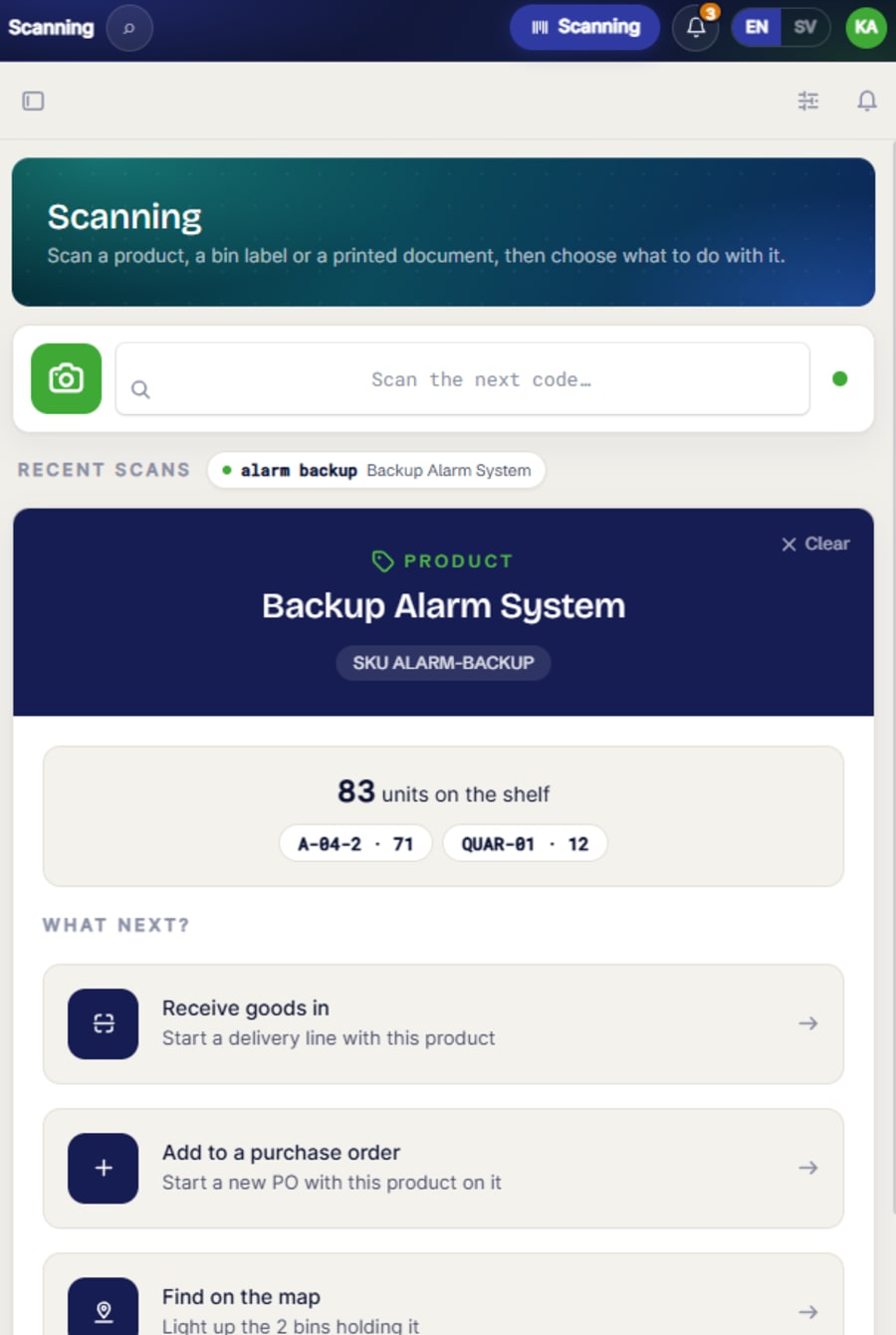
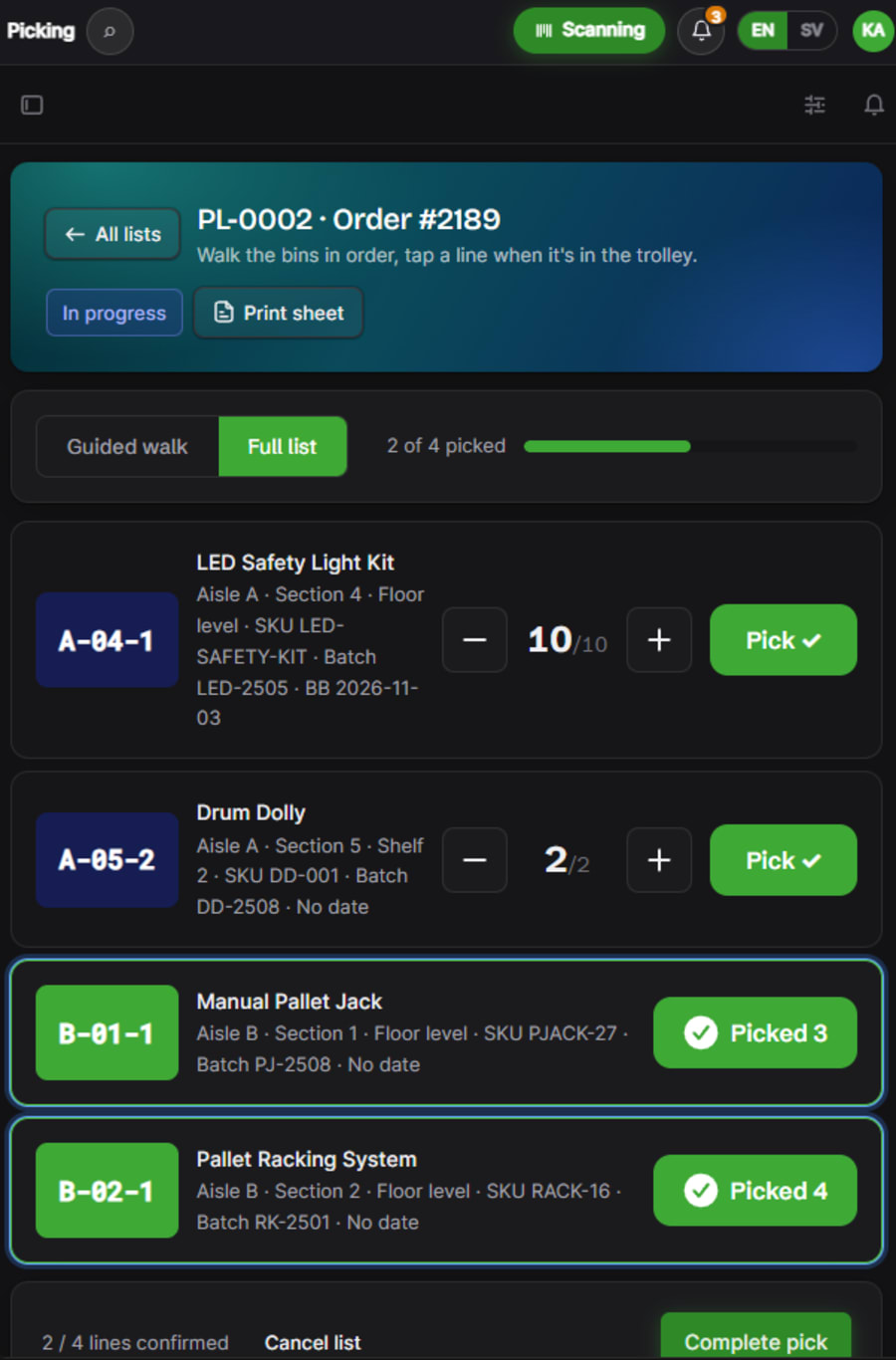
A guided pick walk. One location at a time, with the batch and best-before at every stop.
Goods in
One door for everything that arrives.
Deliveries are received against the purchase order into batches and bins, with a delivery check filed alongside.
- Suggests the purchase order to match, and handles part deliveries
- Delivery control: temperature, packaging, labels and photos
- Suggests bins so a product's batches stay together
- A goods receipt PDF for every delivery
Products
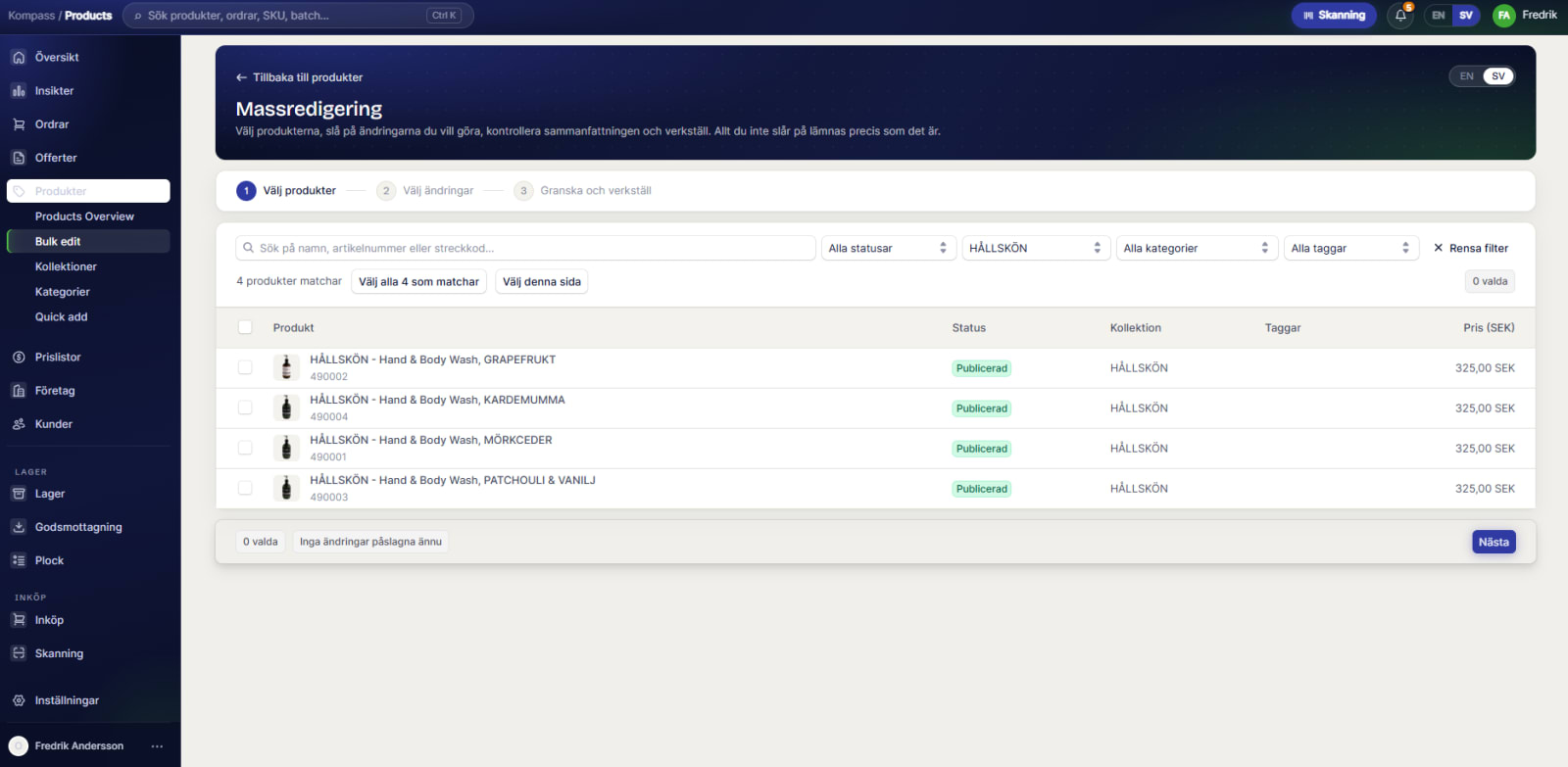
One catalogue, for the back office and every shop window.
Products, prices and content are kept once in Kompass and published to the channels that should show them: your own online store, Kassa tills, marketplaces or a printed catalogue.
- Units, cases and pallets, each with its own barcode
- Batch-tracked goods, services and fees, deposits and returnable pallets
- Descriptions, pictures and translations for customer-facing channels
- Price lists per customer group, and bulk edits across hundreds of products
Product
Still water 24×500ml
DRK-WATER-24
Batch and best-before tracked
Picked oldest first
Units and barcodes
Shown on
Description, pictures and translations are kept once and published to every channel that shows the product.
Purchasing
Buying, from the same system.
Suppliers, their products and their own codes live in Kompass, so reordering starts from what is actually running low.
- Purchase orders numbered for you, as a PDF ready to email
- Editable until goods arrive, then locked, with a list of changes
- Supplier codes on the PO, so their warehouse knows what you mean
- Payment terms, Incoterms and cost prices in any currency
Purchase order
PO-1043
Northgate Wholesale Ltd
To: Brook Valley Drinks
Delivery: 28 Oct 2026 · Terms: 30 days
| Our code | Supplier code | Product | Cases | £ each |
|---|---|---|---|---|
| DRK-WATER-24 | AQ-500-24 | Still water 24×500ml | 120 | 4.10 |
| DRK-OJ-12 | OJ12-F | Orange juice 12×1L | 60 | 8.25 |
| PKG-TAPE-48 | TP48-6 | Parcel tape 48mm, 6 rolls | 40 | 4.90 |
Documents
Paperwork that writes itself.
Order confirmations, delivery notes, purchase orders and packing slips come out in your branding, in the customer's language.
- Swedish, English, French and German, picked from the customer's country
- Delivery notes filled in with batch numbers once the pick is done
- Pick lists, goods receipts, traceability reports and bin labels
- A recall list for any batch, printable in one click
Access
Everyone sees what their job needs.
Roles are set per area of the business, from view only to full control, and the screens follow.
- Owner, manager, sales, warehouse and viewer to start from
- Margins, accounting and deletes hidden from those who shouldn't see them
- View Kompass as another person, to check before you hand it over
- Shared iPads lock themselves after a quiet spell
| Role | Orders | Stock | Picking | Purchasing | Margins | Accounting |
|---|---|---|---|---|---|---|
| Owner | Full | Full | Full | Full | Full | Full |
| Manager | Full | Full | Full | Edit | View | View |
| Sales | Edit | View | None | None | None | None |
| Warehouse | View | Edit | Full | View | None | None |
| Viewer | View | View | View | View | None | None |
Insights
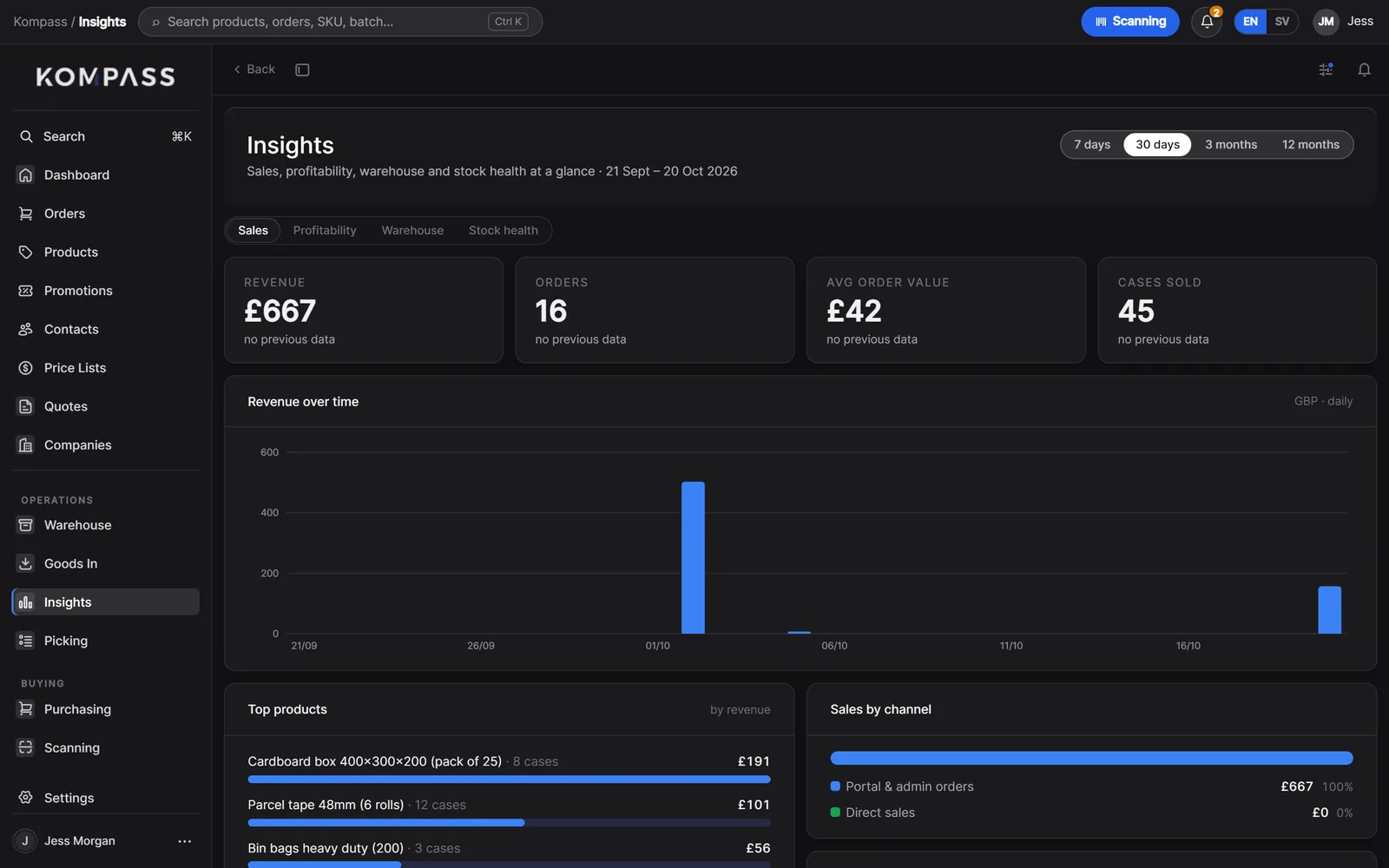
The numbers, without a spreadsheet.
Sales, margins, the warehouse and stock health for any period, drawn from the same records the business runs on.
- Revenue, orders and cases by day, week or month, per channel
- Margins by product and customer
- Batches expiring soonest and stock below its reorder point
- An alert centre for expired batches and missing prices
Kompass in production
A wholesaler's store, orders and warehouse, on Kompass.
A Swedish food and drink wholesaler ran on a marketplace tool, email and spreadsheets. Kompass now runs its own trade store, every order, a batch-tracked warehouse with FEFO picking on the iPad, and its purchasing, with deposit lines and warehouse wall screens built for the way they work.
Read the case study- from discovery to live
- 8 weeks
- lower monthly running costs
- 31%
- transaction fees on any order
- 0
With Kassa
One shelf, every counter.
Add Kassa and every way you sell, online, at the sales desk and over the counter, comes off the same stock as the warehouse. Kassa sells, Kompass receives and picks, and it all lands in one ledger.
About Kassa Online store
On the shelf, as this screen sees it
137cases
Trade counterOn the shelf, as this screen sees it
137cases
 Goods in
On the shelf, as this screen sees it
137cases
The stock ledger, in Kompass
Still water 24×500ml
DRK-WATER-24 · Bin B-03-1 · Batch L2608 · Best before 30/06/2027
137
cases on the shelf
- 10:41CounterSold at the trade counter · Jess, till 1−2
- 10:05OnlineOrdered online, picked for The Corner Deli · Sam, iPad 2−12
- 08:30Goods inReceived on PO-1039 · Ali, dock+48
Try the buttons. Kassa sells, Kompass receives and picks, and every door writes to the same ledger. Nothing to reconcile at the end of the day.
What is inside
The detail, in one place.
What comes as standard. Anything missing for your business is the part we build.
Product types
- Units, cases and pallets
- Batch and best-before
- Services and fees
- Deposits and returnable pallets
Barcodes
- EAN-13 and EAN-8
- GS1-128 batch and best-before
- SSCC pallet labels
- Your own bin labels
Documents
- Order confirmation
- Delivery note
- Purchase order
- Packing slip
- Goods receipt
- Traceability report
Connects to
- Its own online store
- Kassa tills, desks and shops
- Marketplaces and other channels
- Visma eAccounting (Spiris)
- Couriers and more, on request
Devices
- Any modern browser
- iPad, signed in by PIN
- Bluetooth and camera scanning
- Warehouse wall screens
Languages
- English and Swedish screens
- Four languages on documents
Made for
- Wholesalers and distributors
- Food and drink businesses
- Trade suppliers
- Retailers with their own warehouse
Where
- United Kingdom
- Sweden and the Nordics
- Across Europe
- Built and supported from the UK
Service
Features are easy to copy now. Service is not.
Software is quicker to build than ever, so what sets a system apart is who stands behind it. Every Stackslim system comes with a named service manager, IT support around the clock, and changes whenever your business needs them, all inside one flat monthly fee.
A service manager who knows you
One named person who learns how your business works, from the first call to years after launch. You never start again with someone new, and you never explain your setup twice.
IT support, 24/7, included
Day or night, weekday or weekend, someone answers. Support is part of the monthly fee, never a bolt-on, an hourly rate or a ticket queue.
Shaped before you start, changed whenever you like
Tell us what you need before launch and we build it in. Change your mind later and we add, change or take things away, as part of the same fee.
No hidden fees, ever
No payment fees from us, no per-order, per-user or per-till fees, and no scaling fees as you grow. The fee you agree is the fee you pay.
Hours someone answers, in a normal week
Compare
Kompass or an off-the-shelf WMS?
Off-the-shelf warehouse software is a good choice for plenty of businesses. Here is the honest difference, so you can tell which you are.
- How you pay
- KompassA build, then one flat monthly feeOff-the-shelf WMSPer user, per order or by tierSpreadsheetsFree, until it isn't
- Transaction or order fees
- KompassNoneOff-the-shelf WMSOften, on higher tiersSpreadsheetsNone
- Fits how you already work
- KompassShaped to itOff-the-shelf WMSYou adapt to itSpreadsheetsYes, by hand
- Grows from a few shelves to zones and recalls
- KompassSame system, more modulesOff-the-shelf WMSOften a new plan or a new systemSpreadsheetsNo
- Batch, best-before and FEFO
- KompassBuilt inOff-the-shelf WMSOften, sometimes as an add-onSpreadsheetsManual
- Its own store, a till and marketplaces on one stock
- KompassYesOff-the-shelf WMSUsually through integrationsSpreadsheetsNo
- Documents in your branding and language
- KompassYesOff-the-shelf WMSTemplates, within limitsSpreadsheetsWord and email
- Ready to use on day one
- KompassWeeks, after a short buildOff-the-shelf WMSDaysSpreadsheetsToday
- Ready-made integrations
- KompassBuilt as you need themOff-the-shelf WMSHundredsSpreadsheetsNone
- Who changes it when you need something
- KompassUs, includedOff-the-shelf WMSTheir roadmapSpreadsheetsYou
| Question | Kompass | Off-the-shelf WMS | Spreadsheets |
|---|---|---|---|
| How you pay | A build, then one flat monthly fee | Per user, per order or by tier | Free, until it isn't |
| Transaction or order fees | None | Often, on higher tiers | None |
| Fits how you already work | Shaped to it | You adapt to it | Yes, by hand |
| Grows from a few shelves to zones and recalls | Same system, more modules | Often a new plan or a new system | No |
| Batch, best-before and FEFO | Built in | Often, sometimes as an add-on | Manual |
| Its own store, a till and marketplaces on one stock | Yes | Usually through integrations | No |
| Documents in your branding and language | Yes | Templates, within limits | Word and email |
| Ready to use on day one | Weeks, after a short build | Days | Today |
| Ready-made integrations | Built as you need them | Hundreds | None |
| Who changes it when you need something | Us, included | Their roadmap | You |
Marks a row where the alternative is the better choice. Compared against typical published plans, October 2026.
Which one is right for you
Choose an off-the-shelf WMS if you need to start this week, run a 3PL for many clients, or rely on a long list of ready-made marketplace connections. Choose Kompass when your stock, your customers and your paperwork don't fit a template, and you want the people who built it to keep it running.
Questions
What people ask about Kompass.
Can Stackslim build a custom warehouse management system for my business?
Yes. Kompass is the framework we build custom warehouse and order management systems on, for businesses in the UK, Sweden and across Europe. We start from modules that already run real warehouses, shape them to your stock, your picking and your paperwork, and build what is missing, so you get a custom WMS without starting from nothing.
Is Kompass the same for every client?
It is a framework. The foundations are the same for everyone: the stock ledger, batches, picking, documents and roles. The modules switched on, the screens, the steps and the connections are shaped to each business, so no two installs look quite alike.
Can it be simple?
Yes. The warehouse can be one room with a few shelves and stock counts, and grow into bins, batches and zones later, without moving to a new system.
Who owns the data?
You do. It sits in your own database, and you can have a full export whenever you ask.
Which sales channels can it take orders from?
Its own online store, Kassa tills and sales desks, email and the phone as standard. Marketplaces and other sales channels are connected through integrations we build and run for you.
How long does it take to go live?
It depends on how much we shape. One wholesale client went live eight weeks after the first conversation.
Can it run beside what we have now?
Yes. We often run it in parallel for a few weeks, then move stock and customers across in one go.
Do you work with businesses in the EU?
Yes. We are based in the UK and build for businesses across Europe, with Sweden a core market alongside the UK: a food and drink wholesaler in Sweden already runs its warehouse, orders and trade store on Kompass. Screens come in English and Swedish, documents in Swedish, English, French and German, and Kompass connects to Visma eAccounting (Spiris), which many Swedish businesses use. Businesses elsewhere in Europe are just as welcome. Both frameworks run in a browser, so the warehouse can be anywhere.
How is a custom WMS priced?
A build is quoted once, from what your business needs, then one flat monthly fee covers hosting, support and changes. There are no per-user, per-order or transaction fees, however much the business grows.
Who looks after the system once it is live?
Your own service manager: one named person at Stackslim who knows your business and your system, from the first conversation onwards. They handle changes, questions and new requests, so you never start again with someone new.
Is support really included, and when can we reach you?
Yes. IT support is available 24 hours a day, 7 days a week, and it is included in the monthly fee. There is no hourly rate, no support tier to upgrade to and no ticket queue.
Can we change, add or remove features after we start?
Yes. The system is shaped to your business before launch, and it keeps changing with you afterwards. Ask for something new, change how something works or have a feature taken away, and it is done as part of the same flat monthly fee.
Are there hidden fees, payment fees or fees as we grow?
No. There are no payment fees, transaction fees or surcharges from us, no per-order, per-user or per-till fees, and nothing extra as your volumes grow. The only payment fees are your payment provider's own, at their published rates.
Start from Kompass, shaped to you.
Kompass is a framework: where we start, not where we stop. Tell us how your business runs and we'll say which modules we'd switch on, what we'd shape and what we'd build.
hello@stackslim.co.uk · Replies within 4 hours, Monday to Friday