

Every way you sell, on one framework
Kassa is the selling side of the business: online stores, a sales desk where account managers take orders and quotes, tills at the counter, and payments online and in person. It is modular and shaped to how you sell, and there are no fees or surcharges from us on any sale, however it is paid.
- 4
- ways to sell: online, sales desk, phone and counter
- 0%
- added by us to any sale, online or in person
- £0
- per till, per user or per transaction
- 1
- stock figure behind every channel, shared with Kompass
The selling framework
A framework for selling, not an app.
Kassa is built from modules that share one catalogue, one customer list and one checkout. A trade counter, a sales team and an online shop can use one, two or all of them, and each is shaped to how that business sells.
Online, desk and counter
An online store, a sales desk for account managers and a till are modules on the same checkout, with the same customers and their own prices.
Paid your way
Card online, card on a terminal, cash, on account or a split, through the payment provider you choose. Their fee is the only fee.
Built for how you sell
Made-to-order options, deposits, collection slots, or something only your business does, are built in rather than bolted on.
Start to finish
One sale at the counter, start to finish.
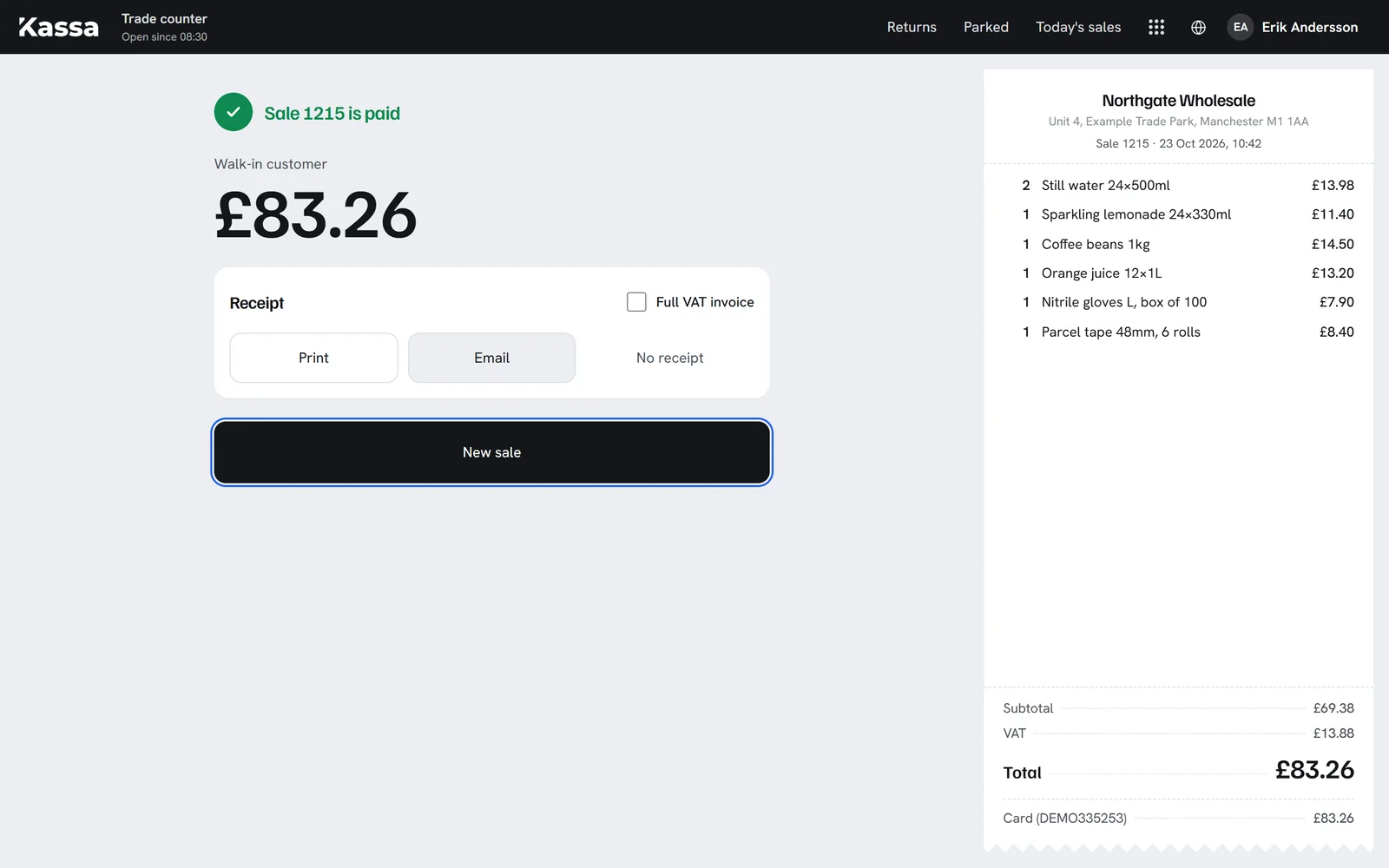
A walk-in customer at the trade counter, from the first scan to the shelf count in the warehouse.
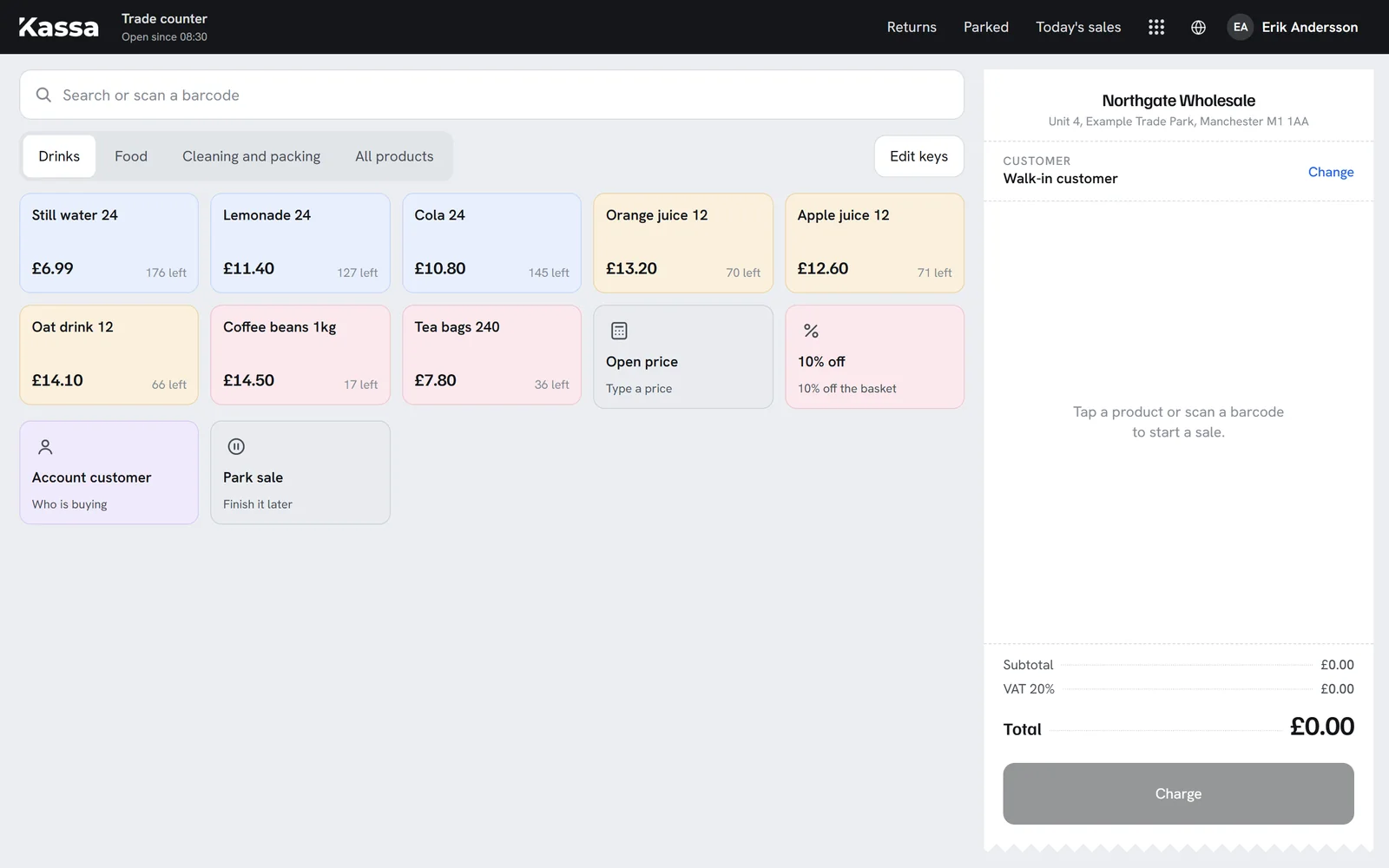
Scan, tap or search
Every barcode on file finds the product. Each tile shows what is left on the shelf.
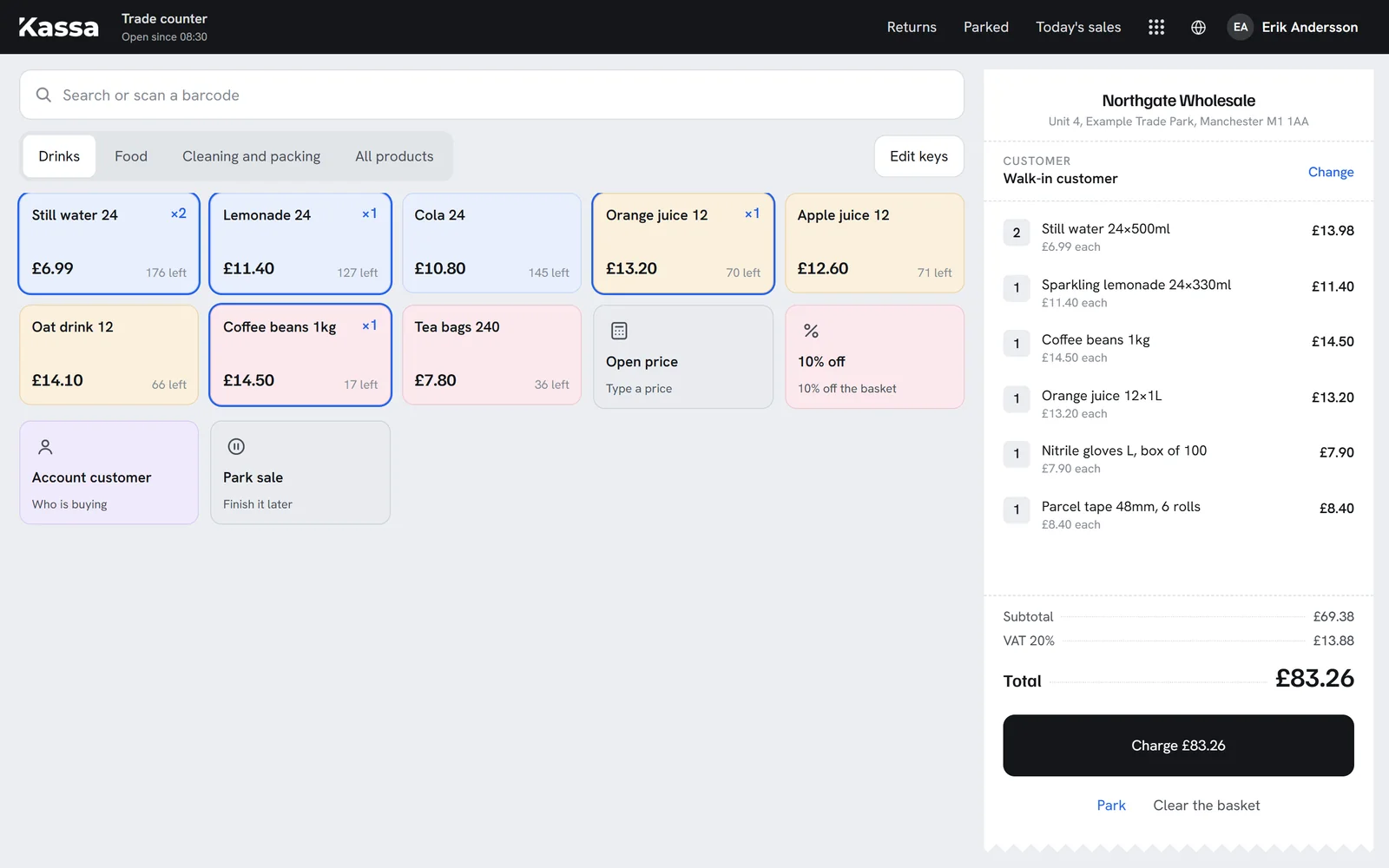
The basket becomes the receipt
Quantities and line discounts as you go. VAT is worked out before anyone pays.
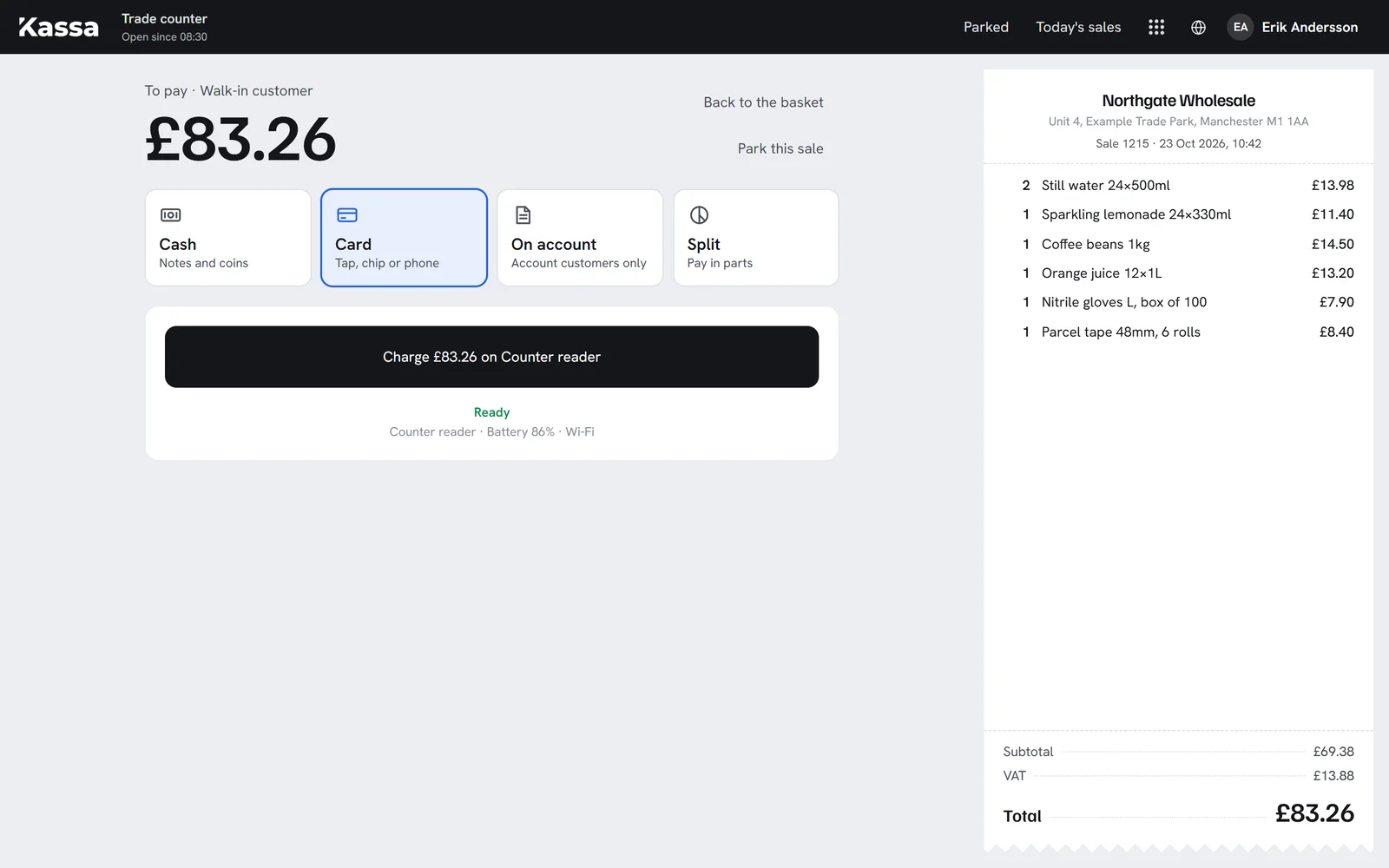
Choose how they pay
Cash with change shown large, card on the terminal, on account for trade customers, or a split.
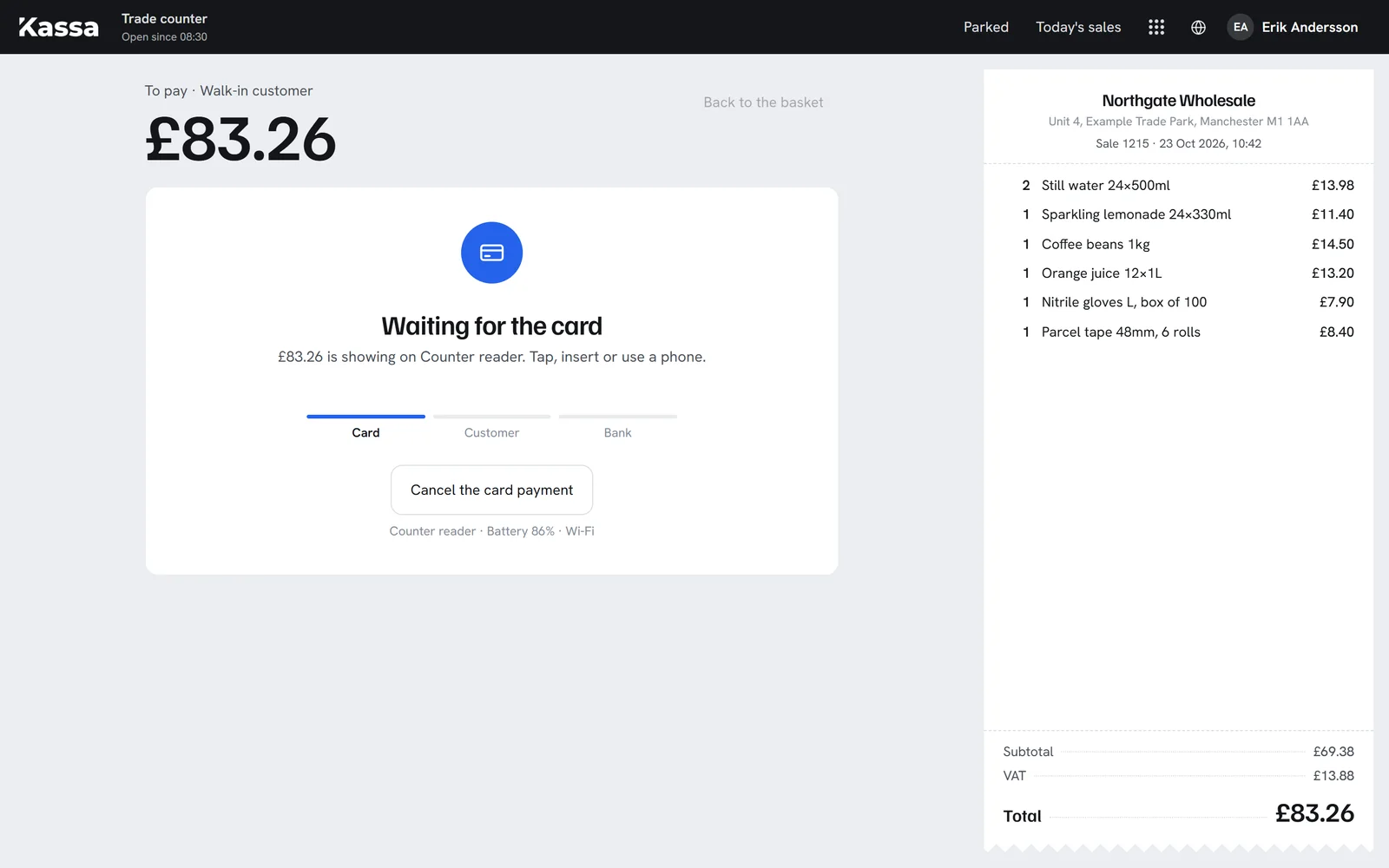
The terminal takes the card
The till sends the amount to the terminal over the internet. The sale only completes for the exact amount approved.
The shelf count is already right
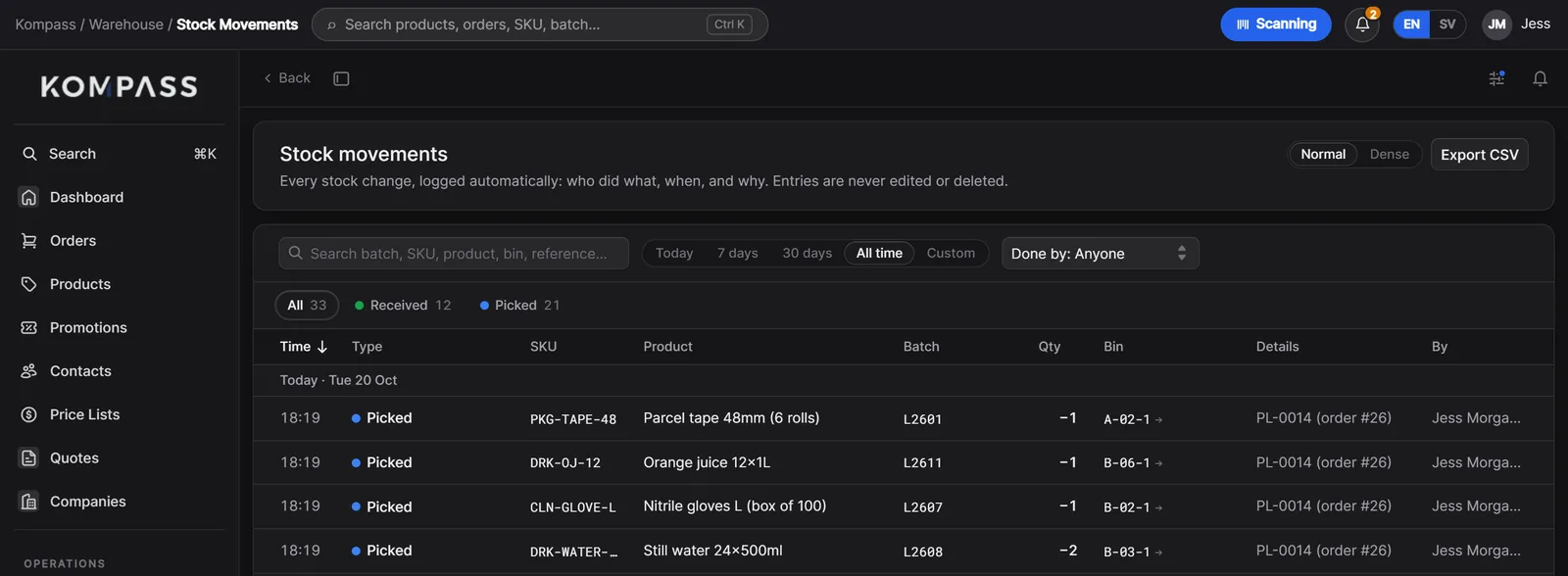
Paid, and picked in Kompass from the oldest batch. The stock figure the warehouse sees has already moved.
No fees from us
Keep every penny of every sale, less the card fee.
No percentage, no surcharge and no fee per till, whichever way a customer pays. See what a per-sale fee would cost you instead.
£40,000
A platform that adds, on each sale
With a platform that adds 1%
£4,800
a year, on top of card fees
With Kassa
£0
a year, on any way of paying
Card fees go to your payment provider, such as Stripe, SumUp or Square, at their published rates, the same as anywhere else, and are left out of both figures. Many ecommerce and till platforms add 0.5% to 2% per sale, or more when you use your own payment provider. Kassa adds nothing, and has no fee per till or per user.
Online
An online store that sells from real stock.
Kassa runs online stores for trade and retail customers: account prices for those who log in, card payments at checkout, and stock checked against the shelf rather than a separate copy.
- Trade stores with account pricing, payment terms and repeat orders
- Retail shops with card payments at checkout
- Delivery, collection, or pay when you collect, chosen at checkout
- Products, pictures and descriptions published from Kompass
How would you like it?
How would you like to pay?
Harbour Cafe Ltd
Held from stock the moment it is placed.
Sales desk
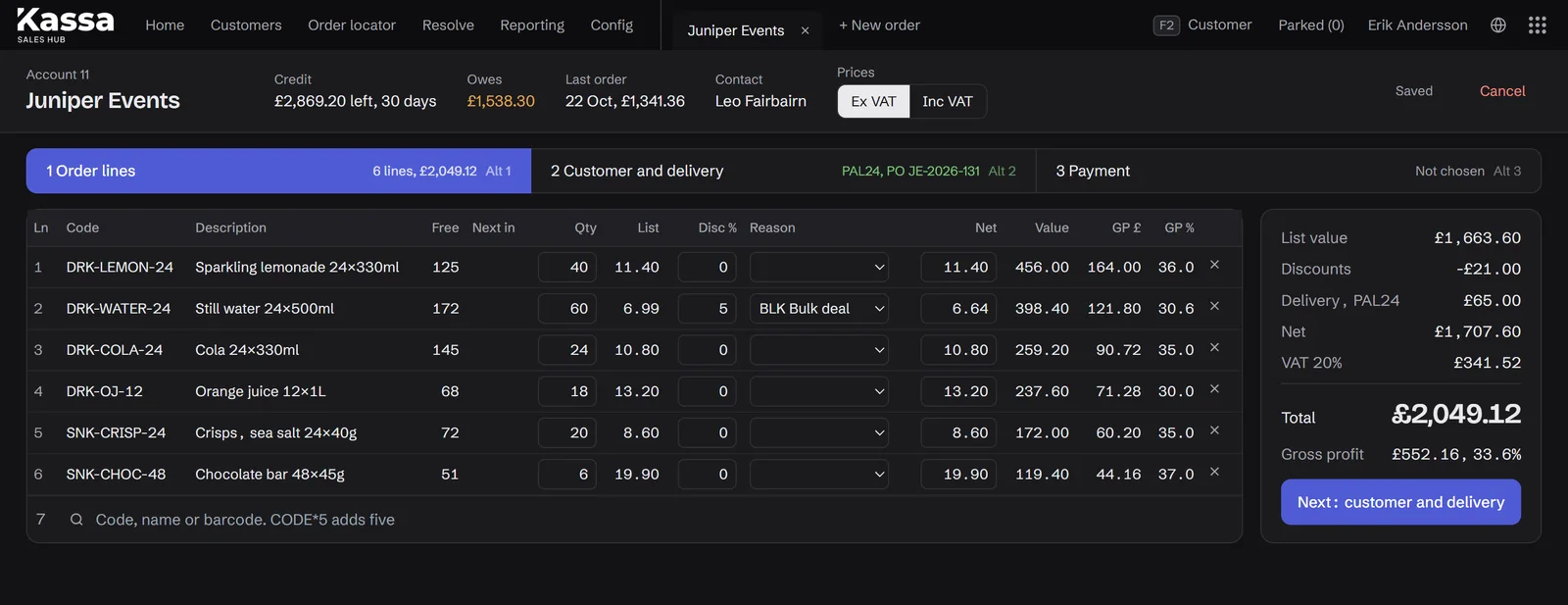
A sales desk for account managers.
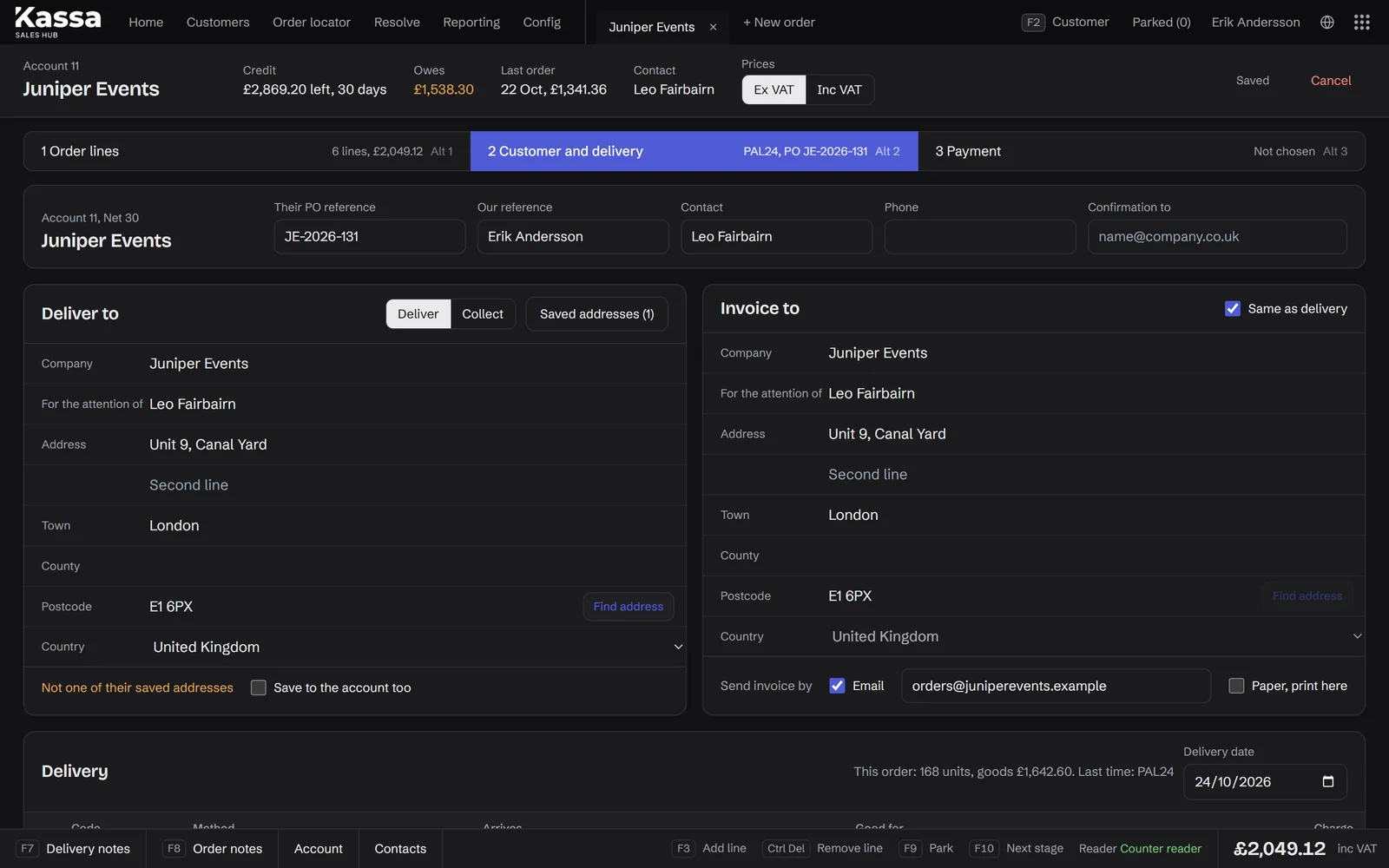
Your sales team takes orders and quotes for their customers in a few clicks. The customer's prices and terms are already there, and an order can be raised against the purchase order the customer sent in.
- Orders and quotes on a customer's behalf, at their prices
- Raised against the customer's own PO number, shown on every document
- Quotes that become orders the moment the customer says yes
- Margins shown to the people who should see them
Counter
A till for the counter, the shop and the stand.
The whole range loads at once, so search and scanning answer straight away, even with a queue. Staff sign in with a PIN on a shared till.
- Search, scan or tap a tile, with categories to narrow it down
- Change quantities and give a discount per line
- Walk-in customers or account customers, picked in a tap
- Receipts on an 80mm roll, and today's takings by payment method
Payments
Every way to pay, and no fees from us.
Card online, card on a terminal, cash, on account or a split. Payments go through your own account with the provider you choose, such as Stripe, SumUp or Square, so their fee is the only fee.
- No fees, surcharges or percentages from us, on any way of paying
- Card terminals connected over the internet, nothing to plug in
- Card payments checked against the exact amount, never reused
- A demo terminal for training staff without real money
Omni-channel
Order one way, pay another.
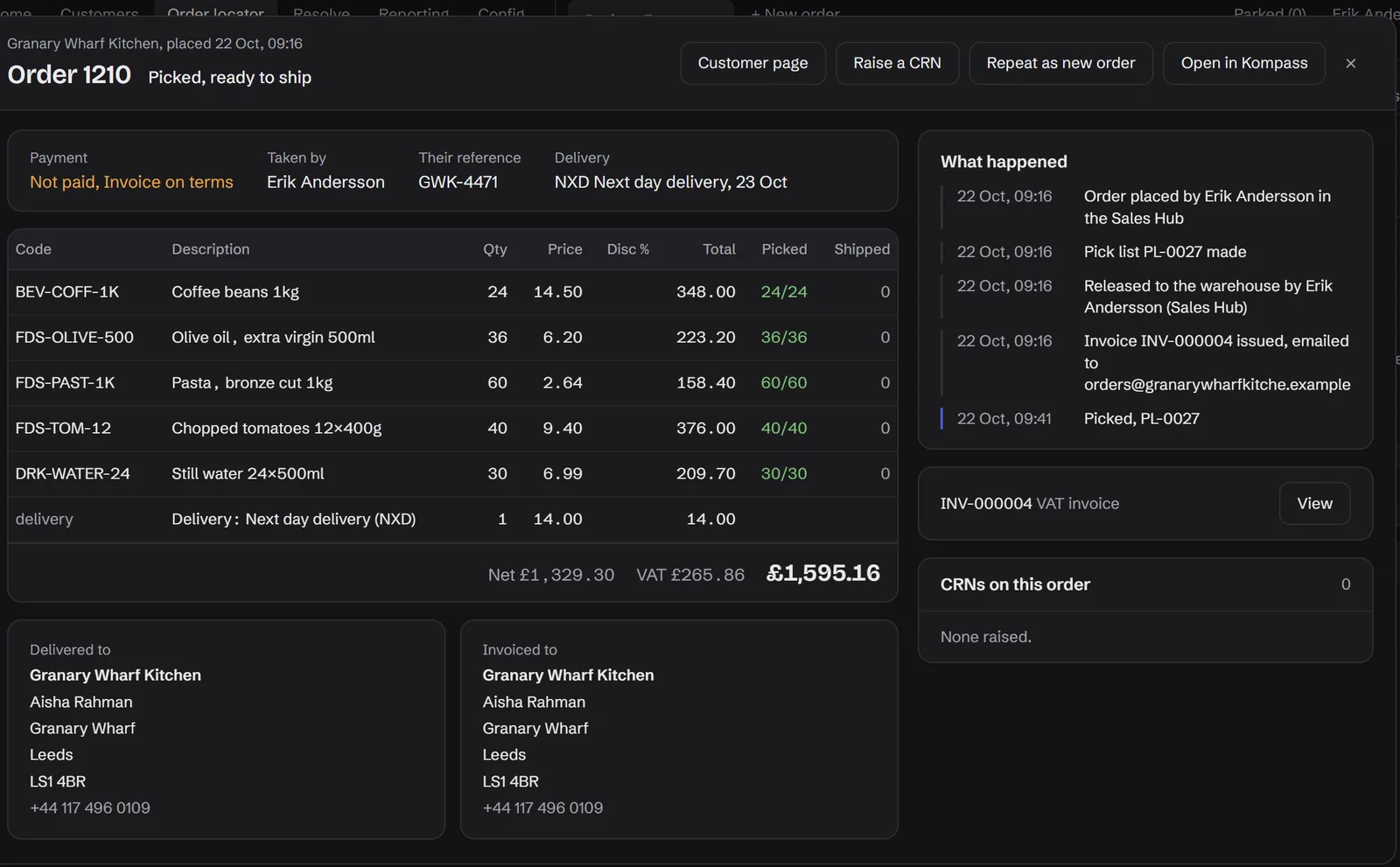
A customer can order online and pay at the counter, buy at the counter and have it delivered from the warehouse, or phone in an order and settle on account. Kassa keeps it as one order, wherever each step happens.
- Order online, collect and pay in person
- Buy at the counter, delivered later from the warehouse
- Phone and email orders, paid on account or when collected
- Every step logged on the same order, for the same customer
Hardware
Hardware that connects without fuss.
Card terminals connect over the internet, so there is nothing to plug in or pair. Receipt printers and scanners are set up with the till. We choose, set up and support the hardware with you.
- Card terminals from your payment provider, such as the SumUp Solo
- 80mm receipt printers and barcode scanners
- Any iPad, tablet or computer with a browser as the till
- Set up and supported by us, like the software
Stock
Every channel sells the same shelf.
With Kompass behind it, every Kassa sale, online, at the desk or over the counter, comes off the same stock and is picked from the oldest batch. There is nothing to reconcile at the end of the day.
- Stock held by unpaid sales on other tills is counted too
- Every sale traceable to its batch, like any trade order
- Abandoned sales are released after half an hour
With Kompass
One shelf, every counter.
Kassa sells and Kompass fulfils. An online order, a counter sale and a delivery arriving at the dock all land in one ledger, so every channel sees the same shelf.
About Kompass Online store
On the shelf, as this screen sees it
137cases
Trade counterOn the shelf, as this screen sees it
137cases
 Goods in
On the shelf, as this screen sees it
137cases
The stock ledger, in Kompass
Still water 24×500ml
DRK-WATER-24 · Bin B-03-1 · Batch L2608 · Best before 30/06/2027
137
cases on the shelf
- 10:41CounterSold at the trade counter · Jess, till 1−2
- 10:05OnlineOrdered online, picked for The Corner Deli · Sam, iPad 2−12
- 08:30Goods inReceived on PO-1039 · Ali, dock+48
Try the buttons. Kassa sells, Kompass receives and picks, and every door writes to the same ledger. Nothing to reconcile at the end of the day.
What is inside
The detail, in one place.
What comes as standard. Anything missing for your business is the part we build.
Sell
- Online stores, trade and retail
- Sales desk orders and quotes
- Tills at the counter
- Phone and email orders
Pay
- Card online
- Card on a terminal
- Cash
- On account
- Split payments
Payment providers
- Stripe
- SumUp
- Square
- Others on request
Hardware
- Any iPad or tablet
- Any computer with a browser
- Card terminals
- 80mm receipt printers
- Barcode scanners
Sign-in
- PIN on a shared till
- Email and password elsewhere
- Customer accounts online
Shares with Kompass
- Products and prices
- Stock by batch and bin
- Companies and accounts
- Orders and picks
Made for
- Trade counters
- Wholesalers selling to trade and retail
- Shops beside a warehouse
- Specialist online brands
Where
- United Kingdom
- Sweden and the Nordics
- Across Europe
- Built and supported from the UK
Service
Features are easy to copy now. Service is not.
Software is quicker to build than ever, so what sets a system apart is who stands behind it. Every Stackslim system comes with a named service manager, IT support around the clock, and changes whenever your business needs them, all inside one flat monthly fee.
A service manager who knows you
One named person who learns how your business works, from the first call to years after launch. You never start again with someone new, and you never explain your setup twice.
IT support, 24/7, included
Day or night, weekday or weekend, someone answers. Support is part of the monthly fee, never a bolt-on, an hourly rate or a ticket queue.
Shaped before you start, changed whenever you like
Tell us what you need before launch and we build it in. Change your mind later and we add, change or take things away, as part of the same fee.
No hidden fees, ever
No payment fees from us, no per-order, per-user or per-till fees, and no scaling fees as you grow. The fee you agree is the fee you pay.
Hours someone answers, in a normal week
Compare
Kassa or an off-the-shelf platform?
Off-the-shelf ecommerce and POS platforms are quick to start and suit plenty of businesses. Kassa earns its place when you sell to trade and retail customers, online and in person, from the same stock.
- Fees on each sale
- KassaNone from us, only your payment provider'sTypical ecommerce or POS platformOften a percentage, more if you use your own provider
- Monthly fees per till or user
- KassaNoneTypical ecommerce or POS platformCommon
- Trade customers with their own prices and terms
- KassaBuilt inTypical ecommerce or POS platformOften an add-on or a higher plan
- Orders against a customer's purchase order
- KassaYesTypical ecommerce or POS platformRarely
- Online, desk and counter on one stock, by batch
- KassaYes, with KompassTypical ecommerce or POS platformSynced through apps, if at all
- Shaped to how you sell
- KassaYesTypical ecommerce or POS platformThemes and settings
- Ready the same day
- KassaAfter a short buildTypical ecommerce or POS platformYes
- Ready-made apps and themes
- KassaBuilt as you need themTypical ecommerce or POS platformThousands
- Selling without internet
- KassaNot yetTypical ecommerce or POS platformOften, for a while
| Question | Kassa | Typical ecommerce or POS platform |
|---|---|---|
| Fees on each sale | None from us, only your payment provider's | Often a percentage, more if you use your own provider |
| Monthly fees per till or user | None | Common |
| Trade customers with their own prices and terms | Built in | Often an add-on or a higher plan |
| Orders against a customer's purchase order | Yes | Rarely |
| Online, desk and counter on one stock, by batch | Yes, with Kompass | Synced through apps, if at all |
| Shaped to how you sell | Yes | Themes and settings |
| Ready the same day | After a short build | Yes |
| Ready-made apps and themes | Built as you need them | Thousands |
| Selling without internet | Not yet | Often, for a while |
Marks a row where the alternative is the better choice. Compared against typical published plans, October 2026.
Which one is right for you
Choose an off-the-shelf platform if you sell only online or only over the counter, want to start this week, and don't mind paying per sale. Choose Kassa when you sell to trade and retail customers in more than one way, want every channel on the same stock, and want to keep every penny of every sale, less the card fee.
Questions
What people ask about Kassa.
Do you take a cut of our sales?
No. There is no percentage, no surcharge and no per-transaction fee from us, on any way of paying. The only fees are your payment provider's own, at their published rates.
Which payment providers work?
The one you choose, such as Stripe online and SumUp or Square in person. Payments go through your own account, so the money and the relationship stay yours.
Does Kassa need Kompass?
They are built to run together: Kassa sells, Kompass fulfils, on one stock figure. Most businesses use both. Where a business already has a back office it is happy with, Kassa can be connected to that instead.
Can account managers sell on a customer's behalf?
Yes. The sales desk raises orders and quotes at the customer's own prices and terms, against their purchase order number if they sent one.
Can Kassa replace our ecommerce platform and our POS app?
Often, yes. Kassa does the work of an online store, a sales desk and a till on one framework, for businesses in the UK and across Europe. Whether it should depends on how you sell, and the comparison on this page shows where an off-the-shelf platform is the better choice.
How is Kassa priced?
A build is quoted once, then one flat monthly fee covers hosting, support and changes. There is no fee per till, per user or per sale from us.
What happens if the internet drops?
Kassa and the card terminal both need a connection, so counter sales pause until it is back. A mobile hotspot keeps a stand at an event selling.
Who looks after the system once it is live?
Your own service manager: one named person at Stackslim who knows your business and your system, from the first conversation onwards. They handle changes, questions and new requests, so you never start again with someone new.
Is support really included, and when can we reach you?
Yes. IT support is available 24 hours a day, 7 days a week, and it is included in the monthly fee. There is no hourly rate, no support tier to upgrade to and no ticket queue.
Can we change, add or remove features after we start?
Yes. The system is shaped to your business before launch, and it keeps changing with you afterwards. Ask for something new, change how something works or have a feature taken away, and it is done as part of the same flat monthly fee.
Are there hidden fees, payment fees or fees as we grow?
No. There are no payment fees, transaction fees or surcharges from us, no per-order, per-user or per-till fees, and nothing extra as your volumes grow. The only payment fees are your payment provider's own, at their published rates.
Start from Kassa, shaped to you.
Kassa is a framework: where we start, not where we stop. Tell us how your business runs and we'll say which modules we'd switch on, what we'd shape and what we'd build.
hello@stackslim.co.uk · Replies within 4 hours, Monday to Friday